
 Latest reviews
 Latest blog posts





AtomStack Fusion review – Is this the 20 W diode laser to buy?
An enclosed diode laser for wood and dark acrylic. Here's what I'd check about the bed size, manual focus and total cost before buying the Fusion.
1. Would I put the Fusion on my workbench?
Say you've got a Saturday to cut some plywood name signs, and you want to get a few keyrings out of the scraps. That's the sort of job that would make me look at the AtomStack Fusion. You get a 20 W blue diode, an enclosure and documented LightBurn support. I'd be interested if I already had somewhere to vent the exhaust.
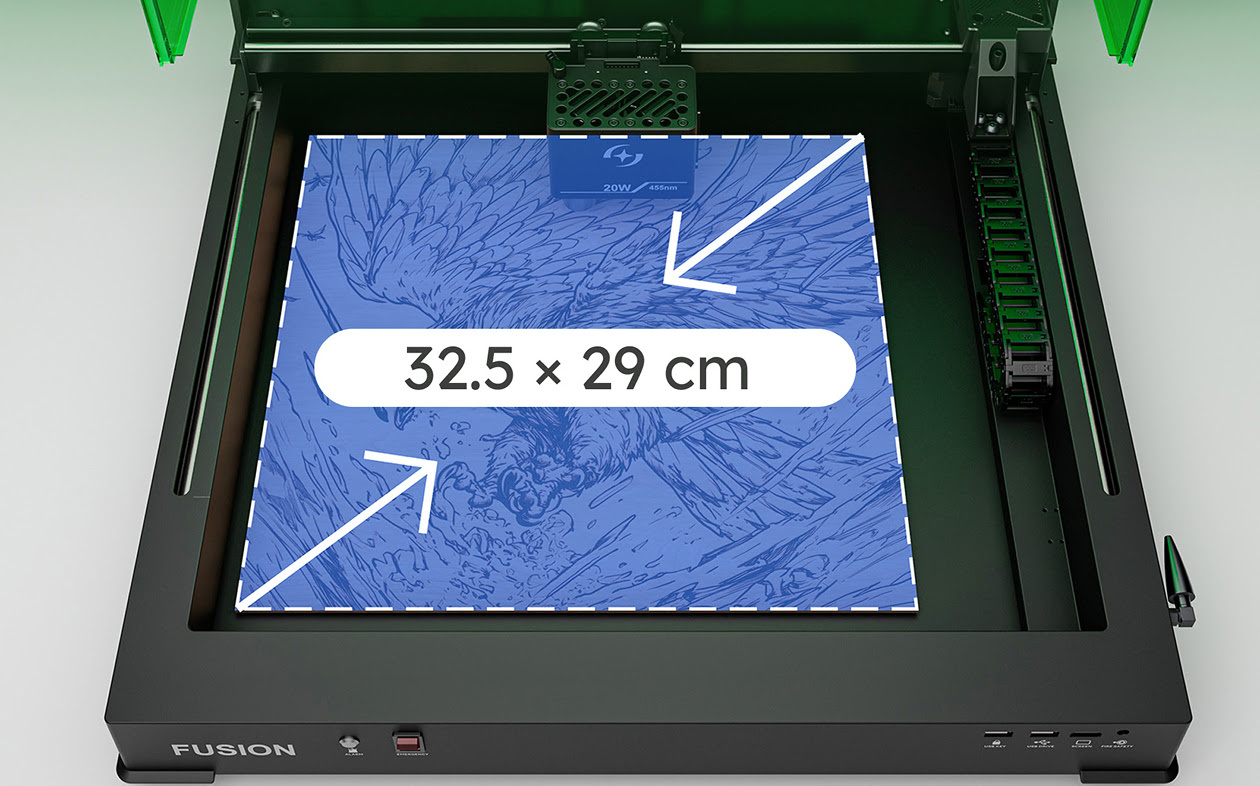
Before you order one, I'd ask two things. How big is the biggest design you want to make? And how often will you need to land an engraving in exactly the right spot on a finished piece? The Fusion has a 325 × 290 mm working area, no built-in camera and manual focus. That's easy enough to work with when all your blanks are the same. A queue of customer-supplied items, offcuts and printed pieces is a different day at the bench.
I checked the manual, AtomStack's model specifications and the shops for this review. It's buying advice based on that research. I haven't measured the Fusion's cut times, edge finish or noise myself.
Big Strengths
- 20 W of optical power for wood projects and suitable dark acrylic
- Class 1 enclosure with an integrated exhaust fan
- LightBurn over USB is documented in the manual
Trade-Offs
- Manual focus and no built-in camera
- 325 × 290 mm working area on the standard machine
- Budget separately for an air-assist pump and any exhaust filtration
Best For
- Small signs, keyrings and flat wooden kits
- Repeat engravings using a simple positioning jig
- A hobby workshop with a plan for the exhaust
2. Measure the project first, then the bench
- Laser modules
- Work area
- 325 × 290 mm
- Max. speed
- 600 mm/s
- Connections
- USBWIFI
- Air assist
- Yes
- Camera
- No
- Enclosure
- Yes
- Autofocus
- No
- Operating systems
- WindowsmacOSLinuxiOSiPadOSAndroid
- File formats
.ai.svg.dxf.pdf.hpgl.plt.rd.png.jpeg.bmp.tiff.tga.gif.jpg- Warranty
- 12 months
- Laser class
- Class 1



AtomStack Europe says the machine takes stock up to 450 × 420 mm. The head can work over 325 × 290 mm. A logo in the middle of a bigger board may fit just fine. A design that runs all the way to the corners is a different story. Even a design the size of a sheet of A4 needs turning the right way, with its 297 mm side along the 325 mm axis and room to line it up. The enclosure measures 552 × 594 × 202 mm. Leave space for the hose at the back and for the lid to swing open. AtomStack Europe specifications
I'd read 600 mm/s as the upper travel speed. A sign that needs a filled engraving and a perimeter cut has its own timetable, set by the artwork, material and settings. AtomStack Europe's support page also gives a nominal 0.1 × 0.2 mm laser spot. If tiny lettering is the whole point of your design, start with a sample at actual size. The finish and heating of the wood matter as much as the number in the spec sheet when you're trying to read small letters. Product specifications, AtomStack Europe support
3. What I'd put under the laser
Wood is the reason I'd buy it. Thin, laser-grade plywood is where I'd start for name signs, model parts and a few keyrings. AtomStack advertises a single pass through 12 mm paulownia, a lightweight timber. The glue and multiple layers in birch plywood make it a different cut at the same thickness. If your project depends on a clean cut through thick ply, ask for a sample cut in your actual stock. I'd also keep an offcut from each new batch for checking the settings. AtomStack's paulownia cutting claim
Dark, opaque acrylic can work with a blue diode. If you're making clear acrylic signs, I'd go straight to comparing CO₂ machines. For metal, suitable coated blanks and anodised aluminium tags are sensible jobs to consider. Marking a black nameplate and cutting a shape out of sheet metal are two different jobs, and I'd use the stock Fusion for the first one. AtomStack's Chinese model page also lists an optional 2 W IR head. I'd treat the EU base model as a single 20 W diode and budget for IR only if the seller can supply the compatible module for that unit. AtomStack Europe material list, AtomStack's model page with the IR option
4. What the workflow looks like
The manual shows a head you fit yourself and a little fold-down gauge for setting the focus against the stock. When you're doing a batch of identical blanks, that setting carries over. Going from a thin board to a much thicker blank means adjusting it again. For ten identical tags I'd make a simple jig and swap each blank into the same corner. For a one-off engraving on a customer's piece, I'd use the framing preview before starting. That's a small step next to the cost of replacing a finished item. Fusion user manual
AtomStack Studio is the free starting point. The EU shop lists the manufacturer's apps for Windows, macOS, Android and iOS alongside LightBurn and LaserGRBL. For LightBurn the manual shows a USB connection and tells you to import the device profile from the included USB drive. The manufacturer lists Wi-Fi as a machine connection. For LightBurn I'd plan around the documented USB setup. Fusion user manual, AtomStack Europe software list
For another angle, 3DZentrale’s spec guide puts the Fusion alongside other diode models. Retailer Brildor’s buying guide compares it with AtomStack’s smaller P2 and Atelier. 3DZentrale’s comparison (German), Brildor’s buying guide (Spanish).
5. See the Fusion on YouTube
DV TECH’s product demo shows the Fusion and some of its accessories in action. The EU base unit ships with the 20 W blue diode. I haven’t found verifiable buyer ratings or an independent hands-on test for the exact 20 W model.
6. What I'd actually budget for
Start with exhaust. The machine has a fan, and the manual lists a hose and clamp in the box. Before buying, figure out where the exhaust will go outside. If there isn't a suitable route, price an extraction and filtration setup rated for the materials you expect to use. AtomStack sells the D4 for this role. On 23 November 2026, AtomStack Europe showed €699 for the base machine and €1,198 with the D4. AtomStack's direct shop listed its EU-plug unit at €699, marked sold out. Compare the delivered price with the extras you'd really use. AtomStack Europe offer, AtomStack direct shop, EU plug
Amazon Germany lists the same model (ASIN B0H5K33D1Q). The listing only shows the price in the cart. Fusion on Amazon.de
Air assist sends air to the cut itself. The exhaust fan draws smoke out of the enclosure. The manual shows an air-assist connection and lists a hose in the box, with the pump absent from the packing list. If cutting wood will be a regular job, I'd ask the seller about a compatible pump and exactly what's in their bundle. For bottles and tumblers, AtomStack Europe lists the R6 roller and R8 chuck, with an H2 riser for extra clearance. The R5 conveyor extends the stated working area to 325 × 800 mm. I'd check the accessory instructions and safety classification for the setup before fitting it. Fusion user manual, AtomStack Europe accessory guide
AtomStack Europe lists the enclosed unit as Class 1 under IEC 60825-1, with lid-open and tilt detection and a flame alarm. I like having an enclosure and those sensors, and I'd stay with the job as the manual directs. Automatic fire suppression requires a separate accessory. AtomStack Europe safety specifications, Fusion user manual
7. What I'd compare it with
I'd look at the Sculpfun E1 12W if engraving makes up most of your work. It comes with a camera, a larger working area and, according to its documentation, a pump in the base package. The xTool S1 20W is my comparison for bigger wood projects. At the same nominal power, xTool gives it 498 × 330 mm of working area. I'd write down the dimensions of the first three things I wanted to make before opening the comparison. That will get you further than sorting a table by its biggest number. Sculpfun E1 review, xTool S1 user guide



Compare the Fusion and S1 20W side by side
8. How I rate the Fusion
Value 8/10. At €699, 20 W in an enclosure with LightBurn is a fair deal. A pump or filtration can add to the bill. Hardware 8/10 for the 20 W diode, integrated exhaust fan and safety features. The smaller bed and lack of a camera matter more at the bench than the headline speed. Ease of use 7/10 because you set the focus and alignment yourself.
Customer service 7/10 for what’s documented. There’s a Fusion support page, a contact route and a standard twelve-month manufacturer warranty. The manual is available, while the EU support page sends many questions to general help. There’s too little evidence to judge response times or how repairs go in practice. The four scores have equal weight, for 7.5/10 overall. Fusion support, AtomStack warranty terms.
9. My take on the AtomStack Fusion
For small wood projects I'd keep it on the shortlist. 20 W, an enclosure and LightBurn cover a lot of what I'd want. For a batch of keyrings, I'd put a jig on the bed and get on with it. For a different finished piece every time, I'd give a camera more weight in the decision. If half-metre signs are regular work, I'd start with a bigger bed. I'd buy the Fusion if the jobs I actually make fit inside 325 × 290 mm and the price still makes sense after sorting out exhaust and, if I need it, air assist.
10. Frequently asked questions
Can the Fusion cut 12 mm plywood in one pass?
Does the Fusion work with LightBurn?
Does the Fusion have a camera or autofocus?
Does it come with an air-assist pump?
Can the Fusion cut metal or clear acrylic?
How do I spot the EU version?
See pp. 5–6 for the box contents and connections, and pp. 8–10 for focus and LightBurn. The product pages cover materials, the camera and the EU model. Fusion user manual, materials and accessories, EU product information.
Written by Max from Best-Lasercutter.com
Max studies Information Systems Engineering and contributes to Best-Lasercutter.com with his background in automation and digital technologies. He focuses on improving the website’s tools and data systems to make laser comparisons more accurate and user-friendly.