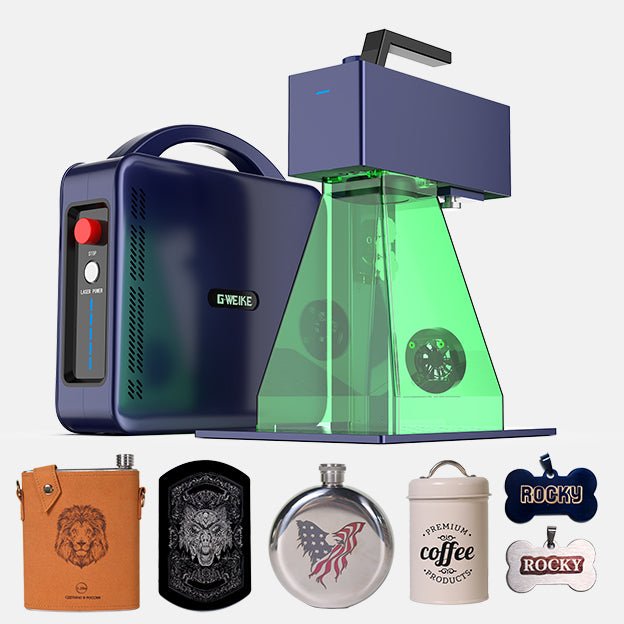
Gweike G2 Max 50W

$2,499.00
Gesamt
7.5
/ 10

Buy the Gweike G2 fiber laser with confidence. Compare specs, price, and performance of the 20W, 30W, and 50W models to find your best deal.

Get more info*byGweike Cloud Shop
Varianten
Price/performance
9.0
Technical parameters
9.0
User-friendliness
7.0
Customer service
5.0

Table of contents

Technical data

Work area
150 × 150 mm
Speed
15000 mm/s
Connection type
USBUSBWIFIWIFI
Air Assist
Not supported
Camera
Supported
Enclosure
Supported
Autofocus
Supported
Operating systems
WindowsWindowsmacOSmacOSLinuxLinux
File formats
.ai.svg.dxf.pdf.hpgl.plt.rd.png.jpeg.bmp.tiff.tga.gif.jpg
Weight
6.5 kg
Warranty
24 months
Release
2024-10-10
Laser class
Class 1

Price & offer

Variants
Last updated: 10/04/2025
Gweike Cloud Shop
Gweike Cloud Shop (United States)
4.0 / 5(36 reviews)
$2,499.00
$2,499.00 (incl. shipping)
Go to offer
Gweike Cloud Shop
Gweike Cloud Shop (Europe)
4.0 / 5(36 reviews)
$2,390.22
$2,390.22 (incl. shipping)
Go to offer
Gweike Cloud Shop
Gweike Cloud Shop (Germany)
4.0 / 5(36 reviews)
$2,390.22
$2,390.22 (incl. shipping)
Go to offer

Pros & Cons

  • PROS
  • Extremely high engraving speed (15,000 mm/s)
  • High precision (±0.001mm repeat accuracy)
  • Portable and detachable for handheld use
  • LightBurn software compatible
  • Excellent performance-to-price ratio
  • Wide pulse frequency range (20-200 kHz) for versatility
  • CONS
  • Inconsistent customer support experiences reported
  • Native G-Laser software is considered weak and frustrating
  • Class 4 laser requires strict safety protocols, especially in handheld mode
  • Documentation can be lacking or confusing for initial setup
  • Built-in fume extraction fan is underpowered

Rating

7.5/ 10
Ø from 4 categories
Price/performance
9.0
Technical parameters
9.0
User-friendliness
7.0
Customer service
5.0

Features

  • 15,000 mm/s Industrial Galvanometer Speed
  • Up to 8K High-Resolution Engraving
  • Detachable Head for Handheld Operation
  • LightBurn Software Compatibility
  • Deep Engraving (Up to 5mm on Metal with 50W)
  • Color Marking on Stainless Steel & Titanium
  • Dual Red Light Positioning System
  • Optional Electric Lift Stand

Customer ratings

Outstanding performance for the price

Marked stainless tools and serialized aluminum parts all week without a hiccup. LightBurn integration sealed the deal.

Small Shop Owner5/52025-02-18gweikecloud.com
Heavy original G2 vs. newer Pro

Owned the 12 kg G2 and upgraded to the 6.5 kg Pro. The wider frequency range and lighter build are obvious in day-to-day use.

Fabrication Tech4/52025-01-27themakerschest.com
Deep coin engraving made practical

30W Pro with a smaller lens chews through brass faster than my old setup. Cycle times finally make sense for small batches.

Custom Coin Maker5/52025-03-03youtube.com
Software was the bottleneck—LightBurn fixed it

G-Laser felt fiddly with SVGs. After moving to LightBurn, workflow is predictable and efficient.

Design Freelancer4/52024-12-12forum.lightburnsoftware.com
Support experience varies

Pre-sales help was quick, but post-sales email replies were slow when I needed a replacement part.

Maker Community Member3/52025-01-05reddit.com
Class 4 power demands real safety

Fantastic results, but don’t underestimate PPE and ventilation. Handheld mode is not for casual users.

Safety-First Engraver4/52025-02-01gweikecloud.com
Great build, a few QC wrinkles

My dual red pointers were slightly off on arrival—easy fix, but QC could be tighter. Otherwise solid construction.

Prototype Lab Lead4/52025-02-22hobbylasercutters.com
50W Max is a beast for production

Material removal rate is leagues ahead of 20W. If time is money, the 50W pays back quickly.

Small-Batch Manufacturer5/52025-03-10themakerschest.com
Not a wood engraver—know your wavelength

Came from a CO2. The G2 crushes metal/plastic marking but is the wrong tool for wood or clear acrylic.

Laser Shop Owner4/52025-01-16gweikecloud.com
Color marking is possible but finicky

Fun for art pieces on stainless, but repeatable color libraries take time. MOPA would be easier.

Metal Artist4/52025-02-08youtube.com

Tests, videos & datasheet

Videos
External reviews
themakerschest.com favicon
themakerschest.com
reviewing-gweike-g2-pro-30w-fiber
Open
the-diy-life.com favicon
the-diy-life.com
gweike-g2-pro-30w-fibre-laser-unboxing-review
Open

Conclusion

Illustration of a friendly robot analyzing laser cutters

The Gweike G2 series offer an unbeatable combination of speed, precision, and portability for their price point. While the native software is a drawback and customer service can be a gamble, its compatibility with LightBurn makes it a top contender for prosumers and small businesses needing a powerful fiber laser for metal and plastic. best-lasercutter.com recommends the G2 Pro/Max to users comfortable with troubleshooting who prioritize raw performance and value.

Get more info*byGweike Cloud Shop

FAQ

What is the main difference between the original G2 and the G2 Pro/Max?
💡
They are two different hardware platforms. The original G2 is a heavier 12 kg first-gen design with a narrow 30–60 kHz pulse frequency range. The G2 Pro/Max are redesigned 6.5 kg units with a much wider 20–200 kHz range, resulting in better material control, smoother finishes, and broader application flexibility.
Which power should I choose: 20W, 30W, or 50W?
💡
Pick based on throughput and depth needs. The 20W handles surface marking and light engraving, 30W is the sweet spot for faster deep engraving and small-batch production, and 50W maximizes removal rate for production-level deep work and the shortest cycle times.
How fast is the G2 series?
💡
Up to 15,000 mm/s marking speed thanks to an industrial galvanometer system. Real-world jobs run slower depending on resolution (2K/4K/8K), fill strategy, and power settings, but the system is substantially faster than typical desktop alternatives.
What precision can I expect?
💡
The platform advertises ±0.001 mm repeat accuracy. This enables crisp micro-features and reliable alignment across multiple passes when the machine is properly focused and rigidly set up.
Does the G2 work with LightBurn?
💡
Yes. Recent firmware/software updates added LightBurn support. You typically create a device profile and may import a configuration file from the G-Laser install directory. LightBurn unlocks more stable workflows and advanced features compared to the native app.
Is the native G-Laser software good enough?
💡
It’s usable for basic tasks, but many users report limitations with vector imports and general workflow polish. The common upgrade path is to use LightBurn for daily production.
What materials can it engrave well?
💡
Metals (stainless steel, titanium, aluminum, brass, copper, precious metals) and many industrial plastics mark very well at 1064 nm. It also works on coated metals and some dark stones and ceramics.
What materials are not suitable?
💡
Wood and other organic materials mark poorly at 1064 nm and pose a fire risk at high power/low speed. Clear acrylic or glass transmit 1064 nm and won’t mark. Avoid PVC due to toxic/corrosive fumes.
Can it engrave in color on metal?
💡
It can produce oxide-layer colors on stainless and titanium by tuning parameters, but results are process-sensitive. For consistent, repeatable color libraries, a MOPA fiber source is generally superior.
What are the working area and focusing options?
💡
Common field lenses provide 110×110 mm or 150×150 mm areas. Focus is set using dual red dots; the 110 lens focuses ~211 mm from the work, the 150 lens ~261 mm. Premium configs add an electric lift for precise, repeatable Z adjustments.
Is handheld mode safe to use?
💡
The G2 is a Class 4 laser. Handheld use removes enclosure controls and demands strict PPE, controlled environments, and trained operators. Desktop use with shielding, eyewear, and proper fume extraction is strongly recommended.
What about warranty and support?
💡
Warranty terms are typically two years for the machine and one year for the source, but vary by region/reseller. Reported support quality is inconsistent—some users receive excellent help and quick parts; others report slow or ineffective responses.
Is a rotary recommended for jewelry?
💡
Yes. For rings and cylindrical pieces, a rotary greatly improves results and throughput. A 20W Pro can handle shallow jewelry marking; for deeper work or faster cycles, consider 30W or higher.
Can I speed up deep engraving without upgrading power?
💡
Using a smaller field lens (e.g., 70 mm) increases power density at the expense of area, which can meaningfully improve depth rate—though it still won’t match the raw removal rate of moving from 20W to 30W or 50W.