
Gweike Cloud 55W

$1,749.00
Gesamt
8.0
/ 10

Read our Gweike Cloud 55W CO2 laser cutter review of this enclosed 510×300mm desktop with rotary, camera and chiller, comparing key specs, uses and prices.

Get more info*byGweike Cloud Shop
Price/performance
8.0
Technical parameters
9.0
User-friendliness
7.0
Customer service
8.0

Table of contents

Technical data

Work area
510 × 300 × 51 mm
Speed
600 mm/s
Connection type
USBUSBWIFIWIFIEthernetETHERNET
Air Assist
Supported
Camera
Supported
Enclosure
Supported
Autofocus
Supported
Operating systems
WindowsWindowsmacOSmacOSLinuxLinux
File formats
.ai.svg.dxf.pdf.hpgl.plt.rd.png.jpeg.bmp.tiff.tga.gif.jpg
Weight
45.6 kg
Warranty
12 months
Release
2025-08-06
Laser class
Class 1

Price & offer

Last updated: 03/17/2026
Gweike Cloud Shop
Gweike Cloud Shop (United States)
4.0 / 5(36 reviews)
$1,749.00
$1,749.00 (incl. shipping)
Go to offer
Gweike Cloud Shop
Gweike Cloud Shop (Europe)
4.0 / 5(36 reviews)
$1,738.04
$1,738.04 (incl. shipping)
Go to offer
Gweike Cloud Shop
Gweike Cloud Shop (Germany)
4.0 / 5(36 reviews)
$1,738.04
$1,738.04 (incl. shipping)
Go to offer

Pros & Cons

  • PROS
  • 55W CO2 tube has strong cutting power for thicker wood and acrylic.
  • Fully enclosed Class 1 design improves safety in home and shared spaces.
  • Large 510×300 mm work area for a desktop CO2 machine.
  • Built-in chiller, air-assist and exhaust simplify setup.
  • 5MP camera makes positioning and repeat jobs easier.
  • Works with both Gweike software and LightBurn.
  • Heavy metal chassis keeps the machine stable during fast jobs.
  • CONS
  • Approx. 45 kg weight makes it hard to move and needs a sturdy table.
  • No touchscreen; always needs a connected PC and software.
  • Fans, chiller and compressor are clearly audible in use.
  • Only 12-month warranty for tube and electronics.
  • Requires proper exhaust or filter to manage smoke and odors.
  • Setup and tuning can be tricky for first-time laser users.
  • More expensive than simple open-frame diode engravers.

Rating

8.0/ 10
Ø from 4 categories
Price/performance
8.0
Technical parameters
9.0
User-friendliness
7.0
Customer service
8.0

Features

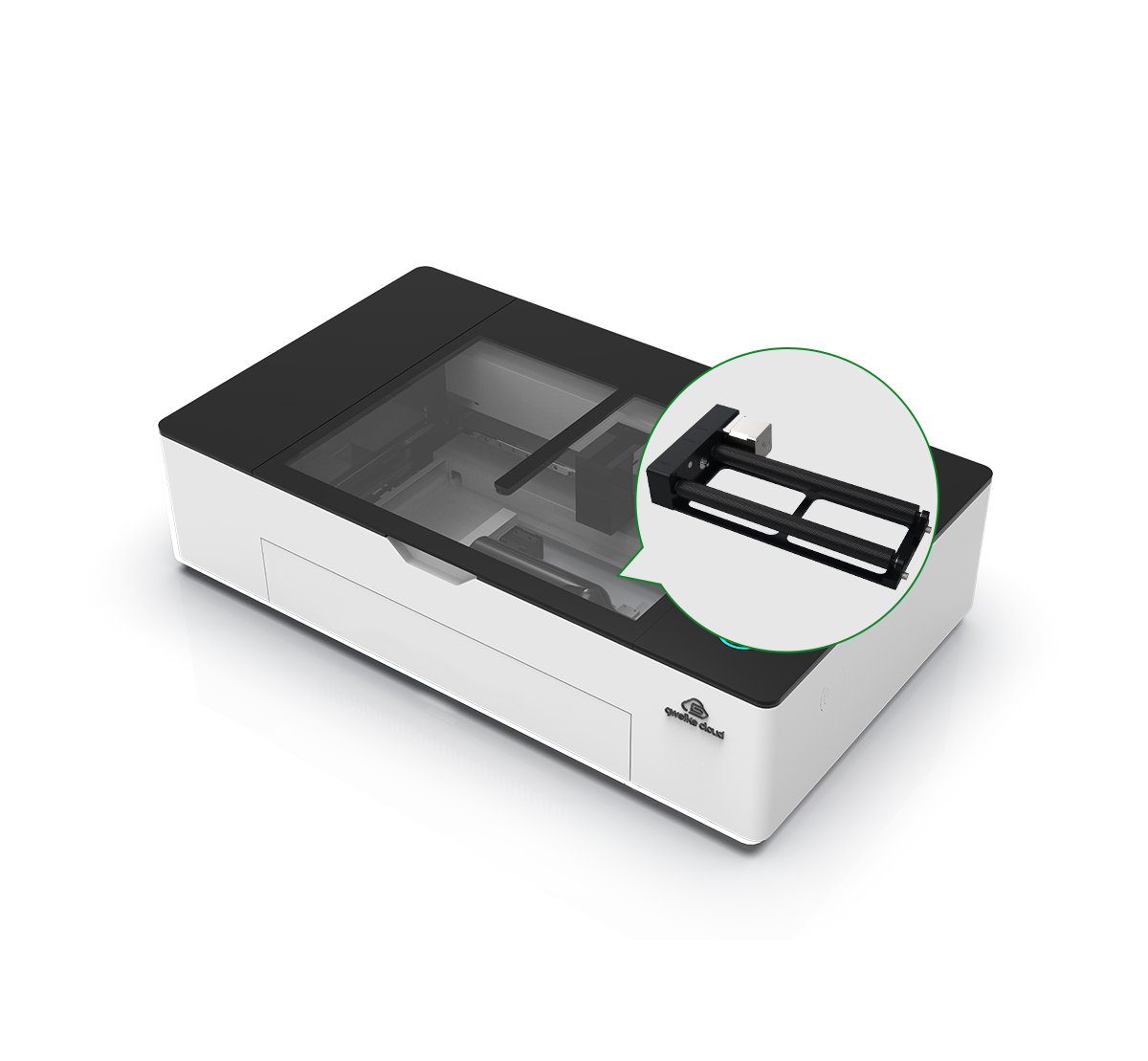
  • 55W sealed CO2 laser tube for cutting and engraving non-metals.
  • Enclosed desktop chassis with safety interlocks (Class 1).
  • 510×300 mm work area with limited Z-height and pass-through slot.
  • Integrated water chiller, air-assist and exhaust fan.
  • 5MP overhead camera for live bed preview and alignment.
  • Compatible with Gweike offline software and LightBurn.
  • Supports rotary attachment for cylindrical engraving.

Customer ratings

Solid alternative to Glowforge

Very strong cutting performance and the built-in chiller is great; setup takes time but results are excellent.

Chris P.5/52025-09-10
Powerful but heavy

Machine quality is impressive, though moving a 45 kg box into the workshop was not fun.

Laura M.4/52025-08-28
Good support experience

Had an issue with alignment; support walked me through calibration over chat the same day.

Ben T.5/52025-08-20

Tests, videos & datasheet

Videos
External reviews
hobbylasercutters.com favicon
hobbylasercutters.com
gweike-cloud-pro
Open
top3dshop.com favicon
top3dshop.com
gweike-cloud-laser-cutter-and-engraver-review
Open
makerhacks.com favicon
makerhacks.com
gweike-cloud-review
Open
noveltymaker.com favicon
noveltymaker.com
gweike-cloud-50w-pro
Open
Datasheet

Conclusion

Illustration of a friendly robot analyzing laser cutters

best-lasercutter.com recommends the Gweike Cloud 55W for makers, Etsy sellers and small studios that want a powerful, enclosed CO₂ laser with camera alignment and rotary support out of the box. If you have a stable workbench, can manage exhaust and don’t mind running it from a computer, it offers excellent capabilities and value compared to many competing enclosed CO₂ systems. If you need something ultra-portable, ultra-quiet or on a very tight budget, an open-frame diode or smaller CO₂ machine may be a better starting point.

Get more info*byGweike Cloud Shop

FAQ

Can it cut 20–25 mm wood in one pass?
💡
On suitable soft woods like basswood the 55W tube can cut around 20–25 mm in one pass, but you will usually slow the speed and may still prefer multi-pass cuts for clean edges.
Does the Gweike Cloud 55W require an internet connection?
💡
No. You can run it fully offline using Gweike Cloud Offline software or LightBurn over USB. Cloud-based control is optional, not mandatory.
Is it compatible with LightBurn?
💡
Yes, the machine uses a Ruida-based controller and works with LightBurn for both vector and raster jobs.
What is the usable work area and Z-height?
💡
The work area is 510×300 mm with about 51 mm maximum workpiece height inside the enclosure; using the bottom pass-through you can work on longer boards.
How loud is it and what about ventilation?
💡
The built-in fan, chiller and compressor reach roughly 70 dB. You must route the exhaust outside or into a suitable filter to handle smoke and fumes safely.