Latest reviews
 Latest blog posts





Independent overview of the WeCreat MakeIt laser software: supported operating systems, file formats, camera functions, pricing and key features.
About WeCreat MakeIt
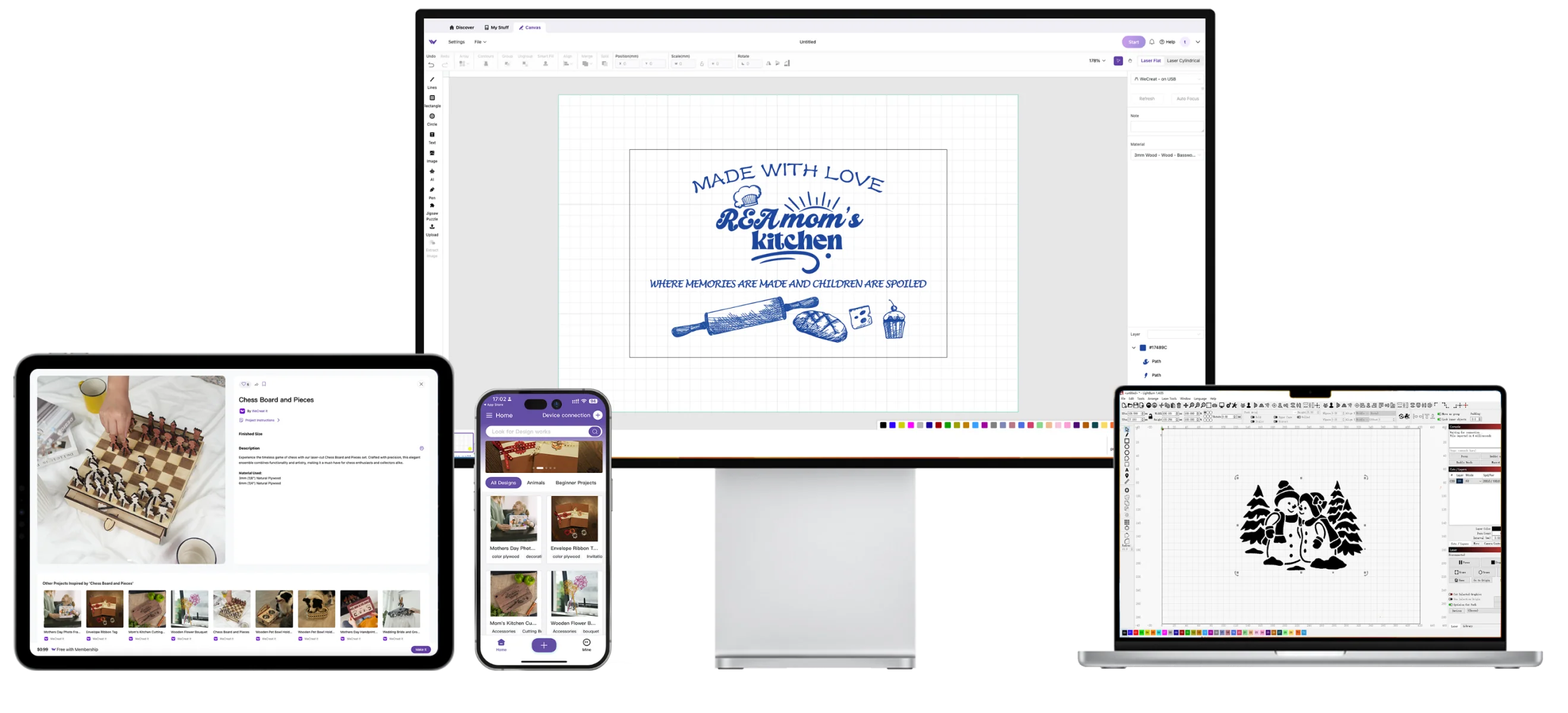
WeCreat MakeIt is a full-featured design and control app for WeCreat Vision/Vista laser machines. It provides an intuitive canvas, a project library, and built-in editing tools (drawing, text, image adjustments and AI-powered image generation) . Users can import their own artwork or start from templates and adjust material parameters. The software directly drives the laser via USB or Wi-Fi, allowing live preview of the work area through the machine’s camera. It streamlines cutting and engraving by offering material presets, automatic focusing, auto-lift Z, and one-click “QuickView” parameter selection. Designs can be created or modified entirely within MakeIt, including basic vector drawing and layout. The app also integrates with LightBurn via G-code (MakeIt provides LightBurn config files), but unlike LightBurn it is tailored exclusively to WeCreat machines. Overall, MakeIt is free to use (aside from optional content subscriptions), cross-platform, and closely integrated with WeCreat’s hardware.
Video tutorial
Our recommended tutorial for WeCreat MakeIt
Watch the tutorial here