Latest reviews
 Latest blog posts





Technical guide to the MKSLaser mobile app for MKS DLC32 controllers: Android/iOS support, workflow, compatible machines, image handling and more.
About MKSLaser
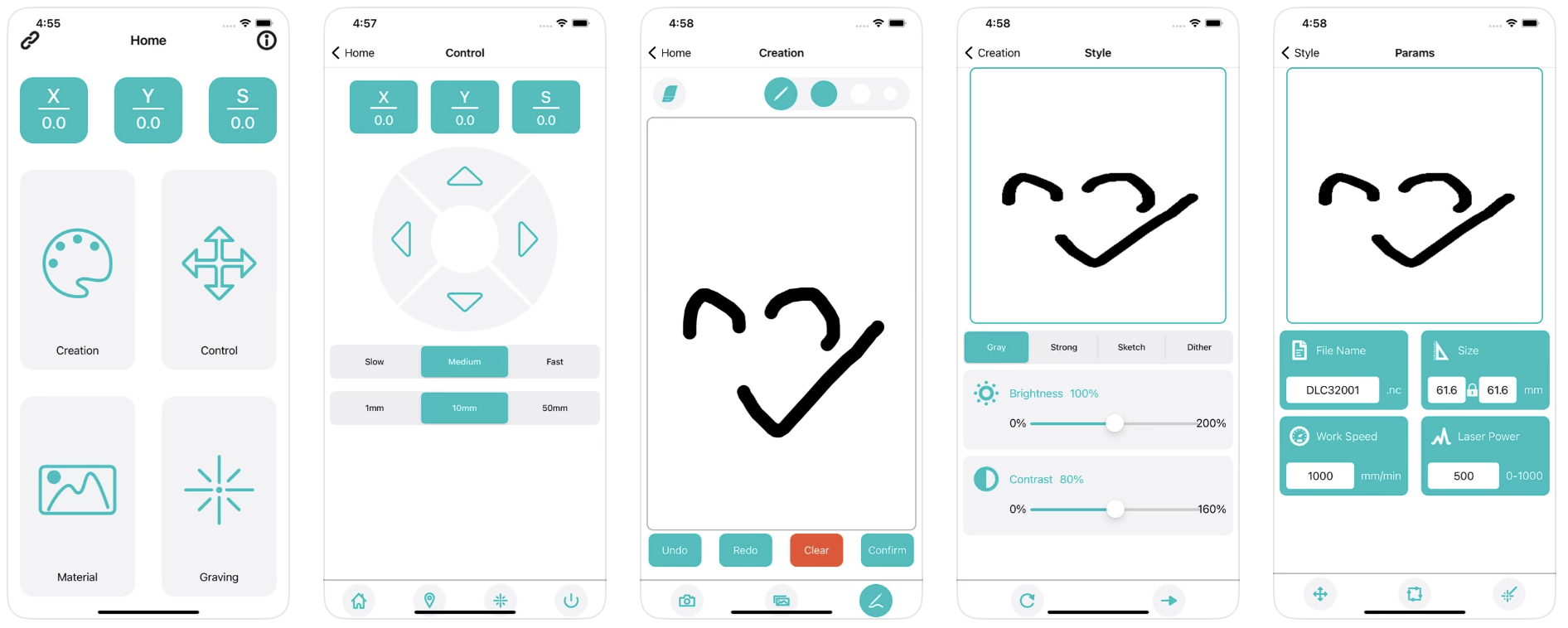
MKSLaser is a mobile control app for laser engravers based on the MKS DLC32/ESP32 boards (like the Longer Ray5). It connects your phone to the laser’s Wi-Fi and lets you operate the machine remotely. Once connected (by entering the machine’s IP on the same network), you can jog motors, set the home position, and switch the laser on/off. Its key feature is the “Creation” workflow: you import or photograph an image on your phone, adjust brightness/contrast, set engraving parameters (speed, power, etc.), then slice it into G-code and upload it to the machine’s microSD card via Wi-Fi . After upload, the file appears on the laser’s file list and can be selected for engraving. According to the MKS DLC32 documentation, the machine’s firmware expects G-code files (e.g. .nc, .gc, .gcode) , so any designs must ultimately be translated to that format. MKSLaser does not natively edit vector graphics – it only processes raster images for “contour” engraving. In practice, most users prepare detailed designs on PC software (LaserGRBL, LightBurn, etc.) and use MKSLaser only to send or tweak simple jobs. The app is free and official from the manufacturer, but user reviews note the drawing features are basic and that some functions (like photo import) may be unreliable on some devices.

Video tutorial
Our recommended tutorial for MKSLaser
Watch the tutorial here