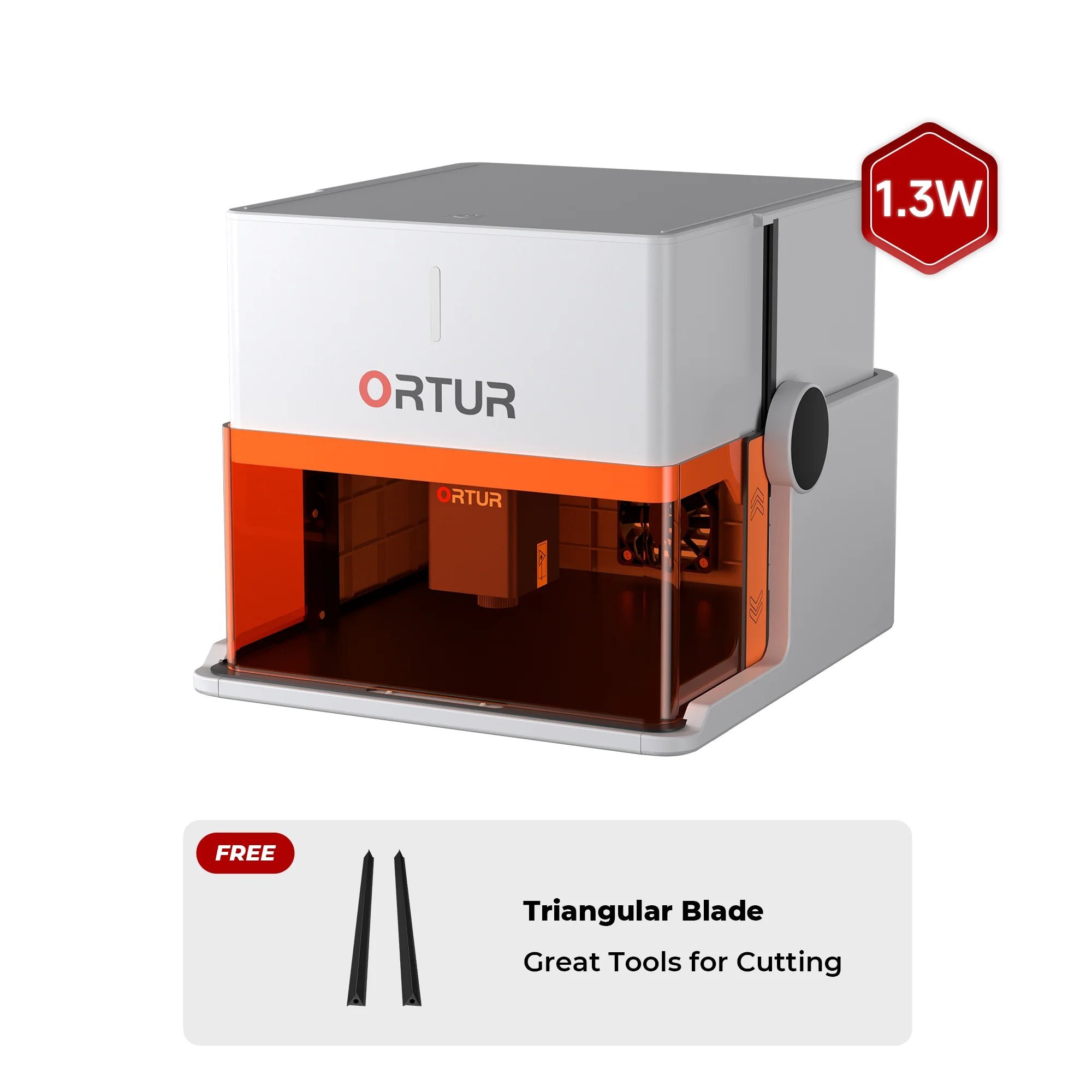
Ortur R1 1.3W IR

$389.00
Gesamt
7.8
/ 10

Looking to buy the Ortur R1 1.3W IR? Read our in-depth review of this portable enclosed infrared laser, compare specs, and find the best metal engraving deals.

Get more info*byOrtur Shop
Varianten
Price/performance
8.0
Technical parameters
6.0
User-friendliness
10.0
Customer service
7.0

Table of contents

Technical data

Laser modules
Diode-IR
1064 nm · 1.3 W
Work area
100 × 80 mm
Speed
83 mm/s
Connection type
WIFIWIFIUSBUSBSD-CardSD-CARD
Air Assist
Not supported
Camera
Not supported
Enclosure
Supported
Autofocus
Not supported
Operating systems
WindowsWindowsmacOSmacOSLinuxLinuxiOSiOSiPadOSiPadOSAndroidAndroid
File formats
.ai.svg.dxf.pdf.hpgl.plt.rd.png.jpeg.bmp.tiff.tga.gif.jpg
Weight
2.4 kg
Warranty
12 months
Release
2025-09-30
Laser class
Class 1

Price & offer

Variants
Last updated: 12/09/2025
Ortur Shop
Ortur Shop (United States)
4.1 / 5(115 reviews)
$389.00
$389.00 (incl. shipping)
Go to offer
Ortur Shop
Ortur Shop (Europe)
4.1 / 5(115 reviews)
$433.70
$433.70 (incl. shipping)
Go to offer
Lasercut

Pros & Cons

  • PROS
  • Extremely portable and lightweight (2.4kg)
  • No assembly required, ready to use out of the box
  • Fully enclosed Class 1 safety design
  • App control with presets makes it beginner-friendly
  • Infrared laser for engraving metals and plastics
  • CONS
  • Very small work area (100x80mm)
  • Very low power, not for cutting
  • No autofocus, camera, or air assist
  • Not compatible with accessories like rotary rollers

Rating

7.8/ 10
Ø from 4 categories
Price/performance
8.0
Technical parameters
6.0
User-friendliness
10.0
Customer service
7.0

Features

  • No-assembly foldable design
  • Ultra-portable 2.4kg weight
  • Class 1 enclosed safety
  • App control for iOS & Android
  • 1.3W Infrared (1064nm) Laser module for metal
  • Offline engraving support

Customer ratings

Perfect starter engraver for small projects

Fold it open, send a file from the app, done. The enclosure and tilt sensor make it feel safe on a desk. Great for keychains and tags.

Lena K.5/52025-09-30
IR module marks metal cleanly

The 1064 nm head did crisp stainless steel logos. Just remember the IR work area is 100×80 mm, so plan layouts accordingly.

Victor S.4/52025-10-19
Super portable, but not a cutter

It’s awesome for engraving on the go, but without air assist and only 5W blue power, cutting thick wood isn’t realistic.

Amelia R.4/52025-10-05
Software is beginner-friendly, then move to LightBurn

The phone app gets you started fast. For real control I switched to LightBurn over USB—no issues.

Gabe M.5/52025-10-23
Small bed is the trade-off

Love the safety and size, but 100×100 mm limits projects. Great for jewelry, labels, and small gifts, not plaques.

Nora P.3/52025-10-10
No camera, no autofocus, and that’s fine

Manual focus is quick with a gauge. The enclosed box and LED status lights are reassuring in a classroom.

Mr. Nguyen4/52025-10-08
Dual-head variant = most flexible

Having both blue and IR in one unit is super convenient. Wish there was an official rotary, but for flat items it’s excellent.

Priya4/52025-10-12

Tests, videos & datasheet

Videos

Conclusion

Illustration of a friendly robot analyzing laser cutters

The Ortur R1 1.3W IR is the ideal choice for hobbyists and crafters needing a safe, portable laser for metal and plastic engraving. For quick personalization of small items like jewelry or keychains, best-lasercutter.com recommends the R1 IR as a top entry-level machine.

Get more info*byOrtur Shop

FAQ

What are the working areas for each R1 variant?
💡
5W Blue: 100×100 mm; 1.3W IR: 100×80 mm; the dual-head model follows those limits depending on which laser is used.
Is the Ortur R1 enclosed and what laser class is it?
💡
Yes, it’s a fully enclosed unit designed to meet Class 1 operation when used as intended.
Which laser modules are available?
💡
Three options: 5W blue (≈450 nm), 1.3W infrared (1064 nm), and a dual-head model that includes both.
Can it engrave metals?
💡
Yes with the 1.3W IR (1064 nm) module—it’s optimized for marking metals and certain plastics. The 5W blue module is mainly for non-metals.
Is it suitable for cutting?
💡
It’s primarily an engraver. Clean cutting is limited, especially without air assist, and the small working area caps project size.
Does it have air assist, autofocus, or a built-in camera?
💡
No on all three. Focus is manual; there’s no integrated camera and no air-assist port/nozzle.
Which accessories are supported (rotary, extensions)?
💡
At launch, Ortur states no compatibility with existing accessories like rotary rollers or extension kits.
What software can I use?
💡
Mobile app (Inspiraesth) for easy starts; desktop support includes LaserGRBL and LightBurn for advanced control.
How do I connect?
💡
Wi-Fi (2.4 GHz), USB tethering, and offline operation (job continues after sending; TF/SD or USB flash drive supported).
How fast is it?
💡
Up to 5,000 mm/min engraving speed (≈83 mm/s), shared across all variants.
How portable is it?
💡
Very—foldable chassis, ~2.4 kg net weight, integrated handle.
What safety features are included?
💡
Enclosed design, lid-open pause, tilt detection, exposure watchdog, USB lock, auto-shutdown, and status LEDs (white/yellow/red) to indicate states and faults.