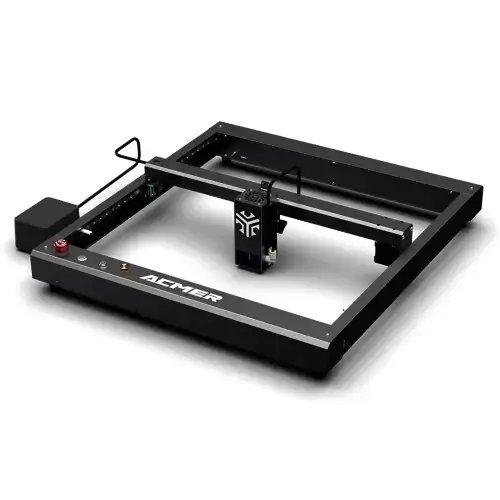
Acmer P2 33W

$659.00
Gesamt
8.5
/ 10

The Acmer P2 33W flagship laser delivers up to 33W cutting power with 30000mm/min speed, linear rails, auto air assist, and advanced safety features.

Get more info*byAcmer Shop
Varianten
Price/performance
9.0
Technical parameters
10.0
User-friendliness
8.0
Customer service
7.0

Table of contents

Technical data

Work area
420 × 400 × 50 mm
Speed
500 mm/s
Connection type
WIFIWIFIUSBUSBSD-CardSD-CARD
Air Assist
Supported
Camera
Not supported
Enclosure
Not supported
Autofocus
Not supported
Software
Acmer AppAcmer App
Operating systems
WindowsWindowsmacOSmacOSiOSiOSiPadOSiPadOSAndroidAndroid
File formats
.svg.dxf.jpg.png.bmp.gif
Weight
6.5 kg
Warranty
12 months
Release
2023-07-03
Laser class
Class 4

Price & offer

Variants
Last updated: 11/22/2025
Acmer Shop
Acmer Shop (International)
2.8 / 5(3 reviews)
$659.00
$659.00 (incl. shipping)
Go to offer
Acmer Shop
Acmer Shop (Europe)
2.8 / 5(3 reviews)
$631.52
$631.52 (incl. shipping)
Go to offer
Amazon
Amazon (Germany)
1.6 / 5(22,018 reviews)
$868.48
$868.48 (incl. shipping)
Go to offer

Pros & Cons

  • PROS
  • Extremely high engraving speed (up to 30,000 mm/min)
  • Industrial-grade linear rails for high precision
  • Comes 95% pre-assembled for quick setup
  • Comprehensive safety features (flame, tilt, key lock)
  • Built-in automatic air assist
  • CONS
  • Open-frame design requires fume extraction and safety diligence
  • Enclosure and camera are optional extra costs
  • No autofocus capability
  • Air assist flow is not adjustable

Rating

8.5/ 10
Ø from 4 categories
Price/performance
9.0
Technical parameters
10.0
User-friendliness
8.0
Customer service
7.0

Features

  • Industrial-Grade Linear Rails
  • Up to 30,000 mm/min Engraving Speed
  • 33W Diode Laser Module
  • Expandable Work Area (to 420x800mm)
  • Comprehensive Safety Suite (Flame/Tilt/Lock)
  • Automatic Air Assist System

Customer ratings

Great combo of speed and value

Setup took under an hour and the linear rails are smooth. At 20W I’m cutting 6 mm ply in one pass with clean edges using air assist.

Sam R.5/52025-03-18
Entry model is perfect for engraving

Went with the 10W for detail engraving on leather and anodized aluminum. Very crisp results; for thick cuts I’d step up to 20W or 33W.

Maya K.4/52025-02-10
33W powers through production jobs

We batch-cut ornaments and signage. The 33W module plus auto air assist saves hours per week. Added an enclosure for fume control—worth it.

PrintForge Studio5/52025-01-27
Open frame means extra safety steps

Machine is fast and accurate, but plan for ventilation and goggles. Also wish autofocus was included. Still an excellent value overall.

Leo D.4/52024-12-05
Clean cuts after dialing settings

There’s a learning curve with speeds/power, but once dialed in the edges are great. Camera add-on helped with placement.

Rachel P.5/52024-11-16

Tests, videos & datasheet

Videos
External reviews
3dwithus.com favicon
3dwithus.com
acmer-p2-33w-review-laser-engraver-cutter-tests-settings
Open
makezine.com favicon
makezine.com
review-acmer-laser-p2
Open
nerdtechy.com favicon
nerdtechy.com
acmer-p2-review
Open
Datasheet

Conclusion

Illustration of a friendly robot analyzing laser cutters

The Acmer P2 33W represents the pinnacle of the series, delivering maximum diode laser power for the fastest cutting speeds and the ability to process the thickest materials. It is designed for prosumers and small businesses who prioritize production efficiency and material versatility above all else.

Get more info*byAcmer Shop

FAQ

What are the main differences between the P2 10W, 20W, and 33W versions?
💡
All three share the same high-speed open-frame gantry (up to 30,000 mm/min), linear rails, and auto air-assist. The only change is the laser module’s optical power (10W, 20W, 33W), which primarily affects cutting speed and maximum single-pass thickness.
What materials can the Acmer P2 series cut and engrave?
💡
Common use: wood, plywood, MDF, leather, paper/card, some dark acrylics, coated metals, anodized aluminum, slate, and painted glass. Like all blue diode lasers, it cannot cut/engrave clear or blue-tinted transparent acrylic without workarounds (paint/masking).
Does it have autofocus?
💡
No. Focus is manual (fixed focus + spacer). This is true for all P2 variants.
Is there an enclosure or camera?
💡
The P2 is open-frame by default (Class 4). A matching enclosure and a top camera are optional accessories.
What software is supported?
💡
LightBurn and vendor software are supported on Windows/macOS. Common image/vector formats (SVG, DXF, PNG, JPG, BMP) work fine.
How big is the work area and can it be expanded?
💡
Standard work area is about 420 × 400 mm. Expansion rails/kits are available on some bundles to extend the Y-axis to ~800 mm.
What is the maximum speed?
💡
Up to 30,000 mm/min (≈500 mm/s) for engraving moves on all variants. Real-world job speed depends on material, power, and line interval.
Does it include air assist?
💡
Yes. The P2 frame includes automatic air assist. Many users still add an external compressor for heavier cutting or cleaner edges.
Can it engrave bare metals?
💡
Blue diode lasers mark stainless steel and some metals at low contrast. For high-contrast metal marking you typically use coatings (e.g., marking sprays) or an IR module sold separately; cutting metal is not supported.
What safety precautions should I take?
💡
Because it’s Class 4 and open-frame, always use proper eye protection, run with an enclosure or adequate fume extraction, keep a fire extinguisher nearby, and never leave jobs unattended.

Similar offers