 Latest reviews
 Latest blog posts




xTool M2 Launch: The Laser Cutter That Wants to Replace Your Printer Too
The new xTool M2 combines diode laser cutting, optional infrared marking and CMYK printing in one camera-aligned platform. Here is what makes it different—and where the compromises remain.
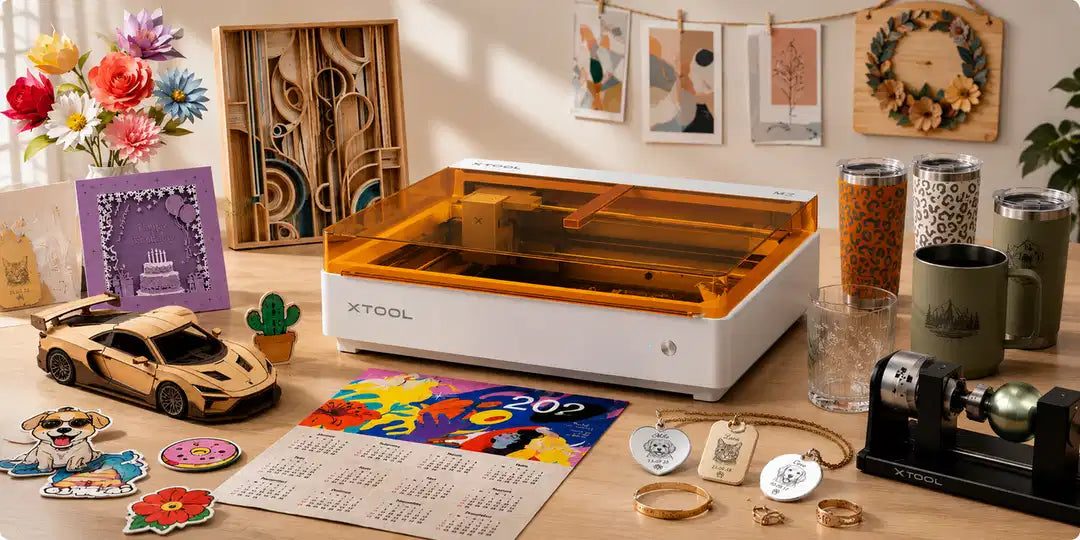
On July 15, 2026, xTool introduced the M2, a desktop machine built around a simple idea: makers should not need one device to add color and another to cut the finished shape. By combining interchangeable diode-laser, infrared-laser and CMYK inkjet modules with camera-assisted positioning, the M2 tries to turn print-and-cut into one connected workflow.
That makes the M2 more interesting than a routine power upgrade. It is xTool's clearest attempt yet to blur the line between a laser cutter, a craft plotter and a desktop printer. The result could be genuinely useful for small shops—but only if buyers understand what is integrated and what still requires a compromise.
What the xTool M2 actually combines
The base machine supports 10W or 20W blue-diode laser modules for engraving and cutting. xTool rates the 20W version for a one-pass cut through up to 10 mm basswood plywood, while the 10W version is rated for up to 8 mm. Both use a 426 × 320 mm processing area and can move at up to 600 mm/s.
Two optional heads broaden the machine's role:
- A 3W, 1064 nm infrared module is intended for marking metals and selected plastics.
- A CMYK inkjet module adds full-color printing with a claimed resolution of 1200 dpi and a maximum print speed of 150 mm/s.
The important detail is that this is one chassis with swappable modules—not a laser and printer firing at the same time. The appeal is the shared coordinate system. A distant-view and close-view camera help the software locate the material, place artwork and preserve registration when a project moves from printing to cutting. For the inkjet workflow, xTool specifies combined processing accuracy of 0.3 mm or better.
Why color changes the laser workflow
Traditional diode engraving creates contrast by burning, removing or discoloring the surface. That works beautifully for line art and natural textures, but it cannot reproduce a full-color illustration. Makers who want colorful signs, labels or packaging normally print elsewhere, transfer the sheet, then align a cutter by hand or with registration marks.
The M2 is designed to remove that handoff. A user could print artwork on basswood, paper, adhesive labels, photo paper, acrylic or canvas, then cut the outline on the same bed. That opens practical workflows for custom stickers, cake toppers, keychains, branded packaging and layered wall art—especially when the same design must be repeated in small batches.
This is the M2's strongest idea. The headline is not merely “a laser with an inkjet.” It is a bid to make registration, the tedious part of mixed-media production, largely automatic.
The trade-offs matter
The M2 is not a universal fabrication machine. Its CMYK system uses water-based dye ink, and xTool explicitly advises keeping finished prints away from water. Outdoor signs, drinkware and frequently handled products may therefore need a suitable protective finish—and makers should test how that finish reacts with both the ink and substrate.

The accessory ecosystem also has boundaries. According to xTool's current FAQ, the M2 does not support a riser base, conveyor feeder or honeycomb panel. It uses xTool Studio rather than LightBurn, which may be a significant workflow change for experienced laser users. The optional modules are specific to the M2 and are not interchangeable with heads from other xTool machines.
Class 1 certification is welcome for a home-oriented device, but it does not make laser work risk-free. Cutting can still create flame, smoke and hazardous fumes. The machine needs active supervision, appropriate extraction and materials that are known to be laser-safe. Residue inside the enclosure must also be cleaned regularly to reduce fire risk.
Finally, the cutting depths, print accuracy and material compatibility above are manufacturer specifications. Independent testing will need to show how consistently the M2 maintains registration, how the ink holds up over time and whether switching between smoky laser work and precision inkjet printing creates extra maintenance.
Who should consider it?
The M2 looks best suited to crafters and small businesses whose products depend on both color and shape: personalized signs, event decorations, packaging, labels, ornaments and short-run merchandise. For those users, removing a separate printer-and-cutter alignment step could save more time than another jump in laser power.
It is less compelling for workshops focused on thick stock, long panels, high-volume cutting or an established LightBurn workflow. Those buyers may value expansion options and software flexibility more than integrated color.
A meaningful shift, with questions still open
The xTool M2 signals where desktop laser tools are heading. Power and speed still matter, but workflow automation is becoming the more interesting battleground. Cameras, interchangeable toolheads and software-managed registration can turn several specialized steps into one repeatable process.
If the M2 delivers reliable alignment and manageable inkjet maintenance, it could give color-first makers a much easier route from artwork to finished product. For now, it is a promising new category of machine—not a replacement for every laser cutter, printer or craft cutter on the bench.