

 Latest reviews
 Latest blog posts





Specialty Laser Tools and Utilities
Updated November 2025Estimated reading time: 4 min
Not every maker utility fits neat categories like box or gear designers. This roundup highlights all the other helpful tools we could not fit into a specific category. Things like websites that help you design custom rulers or tools to turn your 2D images to 3D images with the help of AI in order to engrave them with relief into a coin for instance.
1. Top 3 specialty laser tools
Below you find our top three tier list for all the other tools and helpers. We rated each tool in terms of the availbale features/customizations and how easy they are to use.
2. Why these utilities matter?
Speciality tools are all those small, focused helpers that do not fit neatly into big categories like box design or gear creation, but still make a huge difference in your laser workflow. Examples include online ruler generators where you can design a perfectly sized measuring tool with your own scale, logo and markings, or depth map generators that turn a 2D image into a 3D style relief for engraving coins, badges and plaques. These tools usually solve one very specific problem and save you from drawing repetitive or fiddly details manually in your CAD software.
For makers with a laser cutter, speciality tools are practical productivity boosters. They help you create custom jigs, gauges, alignment rulers, nameplates and decorative reliefs in minutes instead of hours. Many of them run in the browser, so you just enter dimensions, choose a style and download ready to cut SVG or DXF files. Used alongside your main design software, they help standardise recurring tasks, reduce mistakes and unlock more creative options, from precise workshop accessories to personalised gifts and artistic engravings.
3. Best specialty laser tools
Here we listed all the other currently available and relevant tools that help you make the most out of your lasercutter.
DepthR
Downloads & file types
.png.stl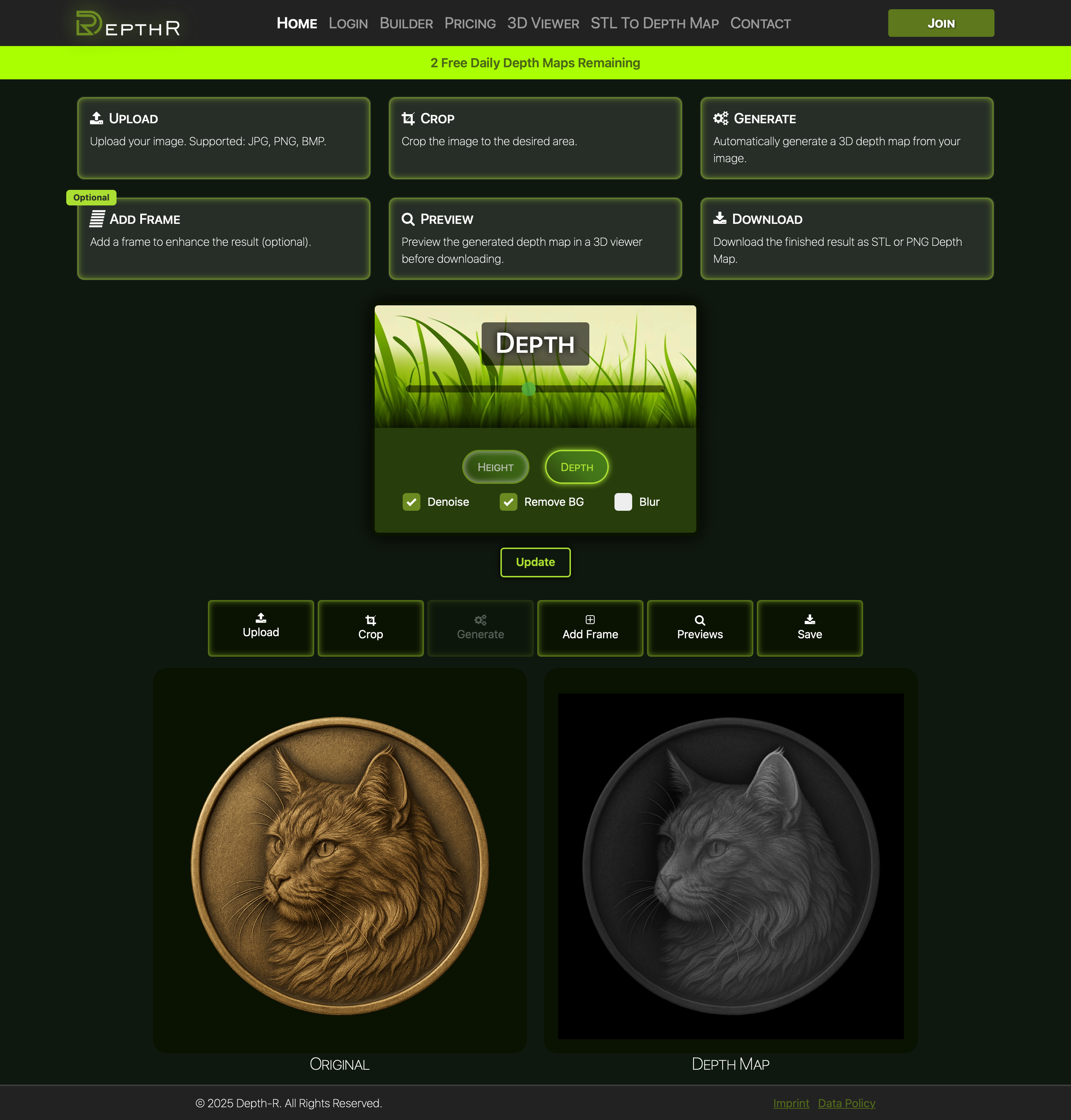
Depth-R is a browser-based tool that converts 2D images into grayscale depth maps and simple 3D relief models (heightfields) that you can download as PNG or STL files. After uploading a JPG/PNG/BMP in the Builder, you crop the image (optionally with square crop and round edges, e.g. for coins), let Depth-R generate a depth map, and then fine-tune the result. You can add decorative frames, preview the relief in an interactive 3D viewer with material presets (gold, silver, brass, etc.) and controls for depth, blur and trimming, and finally export the model for use in laser engraving, CNC milling or 3D printing workflows.
Besides image → depth map, Depth-R also supports STL → depth map: you upload an STL, pick a view direction (top/front/side), set the target resolution and download a depth-map PNG from that perspective. Paid subscriptions remove the daily limit of free conversions and unlock unrestricted exports and commercial-use rights, while an offline version is planned; currently the product is explicitly labelled as being in an alpha state.
Pros
- 3 free conversions per day, perfect to test workflows or occasional projects without paying
- Very focused on relief work (coins, plaques, slate engravings), so the output usually drops nicely into laser/CNC pipelines
- Runs in the browser with an integrated 3D preview, so you can tweak and visualise depth before you waste material
Cons
- Only creates heightfields (no full 3D sculpting or undercuts), so complex models still need real 3D software
- Limited fine control – you adjust global sliders, but can’t paint depth by hand inside the tool
- Web-based and still evolving, so no true offline workflow and no batch processing for big jobs yet
Downloads & file types
.svg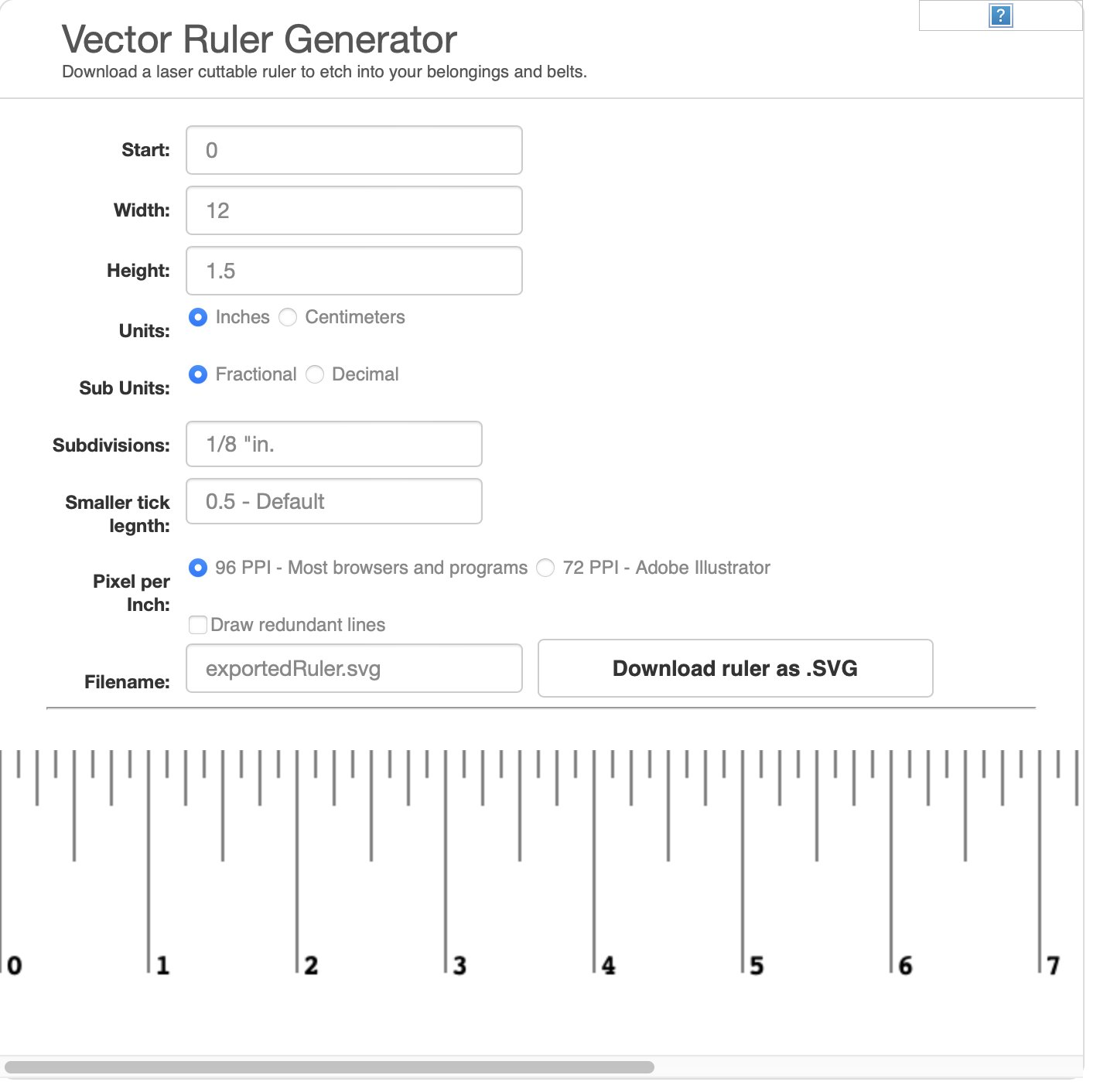
Vector Ruler Generator is a browser-based utility by Robbbb for creating laser-cuttable rulers in SVG format. You specify start and end values, units (inches or centimeters), subdivisions, tick-sizes, font size, and the height of the ruler. Once configured, the tool generates a clean SVG output which you can import into CAD software or directly use with a laser cutter.
The UI is minimal but effective: define your parameters, click update, download the SVG. It’s especially useful if you want to etch or cut a custom ruler onto wood, acrylic or metal—without designing all the ticks and numbers manually.
Pros
- Open-source and free to use for creating custom rulers for laser cutting
- Browser-based so no installation required
- Quickly generates SVG scale rulers in inches or cm, usable in laser/CAM workflow
Cons
- Feature-set is narrow — only ruler generation, not broader tool creation
- Limited export formats (primarily SVG) compared to some full-fledged tools
- While open-source, UI/UX and settings might feel very basic for advanced users
4. Frequently asked questions
What are speciality tools for laser cutters?
Speciality tools are small, focused utilities that solve one specific task for laser users, for example ruler generators, jig and template generators, depth map creators for 3D style engravings, or calibration helpers. They are meant to complement your main CAD or design software, not replace it.
Do I still need CAD software if I use these speciality tools?
Yes. Most speciality tools export SVG, DXF, PDF or PNG files that you will usually import into your normal CAD or laser software. There you can combine them with other parts, position them on your work area and add labels, graphics or cut layers.
Are speciality tools suitable for beginners?
Very much so. Many of them are browser based and use simple forms where you just enter dimensions and options. Beginners can get working rulers, jigs or coin designs without advanced CAD skills, and experienced makers save time on repetitive work.
Will these tools work with my laser cutter brand?
In most cases yes, as long as your machine accepts common file formats like SVG, DXF, PDF or grayscale PNG. The typical workflow is to generate the file in the online tool, import it into your laser software, then set material, power and speed.
What are typical use cases for speciality laser tools?
Common use cases include custom measuring rulers, focus and alignment gauges, fixtures and jigs for repeat work, organisers for tools or board games, nameplates, and 3D style relief engravings on coins, badges or slate. They are especially useful when you repeat similar jobs and want consistent, precise results.
Written by Max from Best-Lasercutter.com
Max studies Information Systems Engineering and contributes to Best-Lasercutter.com with his background in automation and digital technologies. He focuses on improving the website’s tools and data systems to make laser comparisons more accurate and user-friendly.