

 Latest reviews
 Latest blog posts





ScorchWorks•
WindowsmacOSLinux
K40 Whisperer is a free open-source program to control stock K40 CO2 lasers with M2 Nano boards, using SVG/DXF workflows for accurate cutting and engraving.
License / Price
Free
Ease of use
6/10
Features
4/10
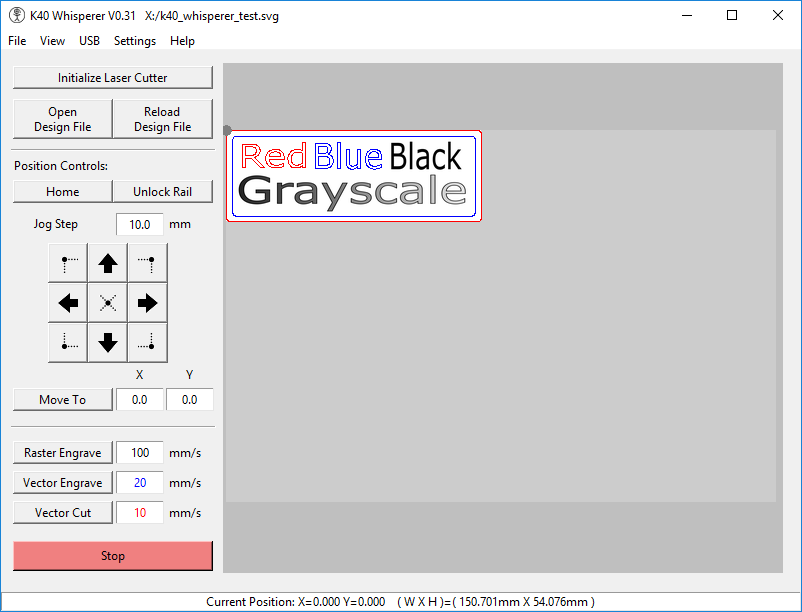
About K40 Whisperer
K40 Whisperer operates K40 CO2 lasers with M2 Nano controllers. It loads SVG/DXF designs and basic rasters, provides positioning and job execution, and replaces proprietary tools. Simple and lightweight, with limited features and no camera alignment.
Video tutorial
Our recommended tutorial for K40 Whisperer
Watch the tutorial here
FAQ
What is K40 Whisperer and why would I use it with a K40 laser cutter?
💡
K40 Whisperer is a free, open-source control software created as an alternative to the stock software for K40 lasers. The typical K40 (40W CO₂ laser) comes with proprietary LaserDRW/CorelLaser software that requires a USB dongle. K40 Whisperer replaces that – it communicates directly with the K40’s controller to run your laser jobs, and it does not require the USB dongle to function. Many makers prefer K40 Whisperer because it lets you use standard design file formats and is generally more user-friendly and reliable than the original software that ships with those cheap K40 units.
What file formats does K40 Whisperer support, and how do I prepare designs for it?
💡
K40 Whisperer operates by reading in SVG or DXF files as input. You prepare your design in a vector editing program (Inkscape, Illustrator, etc.) and save it as an SVG or DXF. The software uses color-coding in these files to differentiate operations: in SVG, blue and red paths are interpreted as vectors (blue for vector engraving and red for vector cutting). In DXF files, similarly, blue entities are treated as engrave and red as cut (note: DXF doesn’t support raster engrave). For engraving images, you can import an image by embedding it in an SVG – K40 Whisperer will convert grayscale images to a halftone dot pattern for engraving. (Direct raster file import isn’t a feature; images should be placed into an SVG.) So in summary: design in SVG/DXF using the proper colors for different laser actions, and the software will handle the rest.
Which laser controllers or boards are compatible with K40 Whisperer?
💡
K40 Whisperer only works with the stock Lihuiyu controllers found in most K40 lasers that use LaserDRW. If your K40 uses one of the common Lihuiyu control boards (e.g. M2 Nano board, etc.), then it will work with Whisperer. It is not compatible with Moshi-board K40 lasers (the ones that run MoshiDraw). In practical terms, if your machine originally came with the LaserDRW/CorelLaser software and a USB dongle, it has the right controller (Lihuiyu M2 or similar) for K40 Whisperer. If it came with different software (like MoshiDraw), K40 Whisperer won’t be able to drive that board.
What operating systems can I run K40 Whisperer on?
💡
K40 Whisperer is available for Windows (both 32-bit and 64-bit). The official downloads include a Windows installer that bundles everything needed. Additionally, since it's open-source (written in Python), it can be run on Linux and Mac OS as well, but those require a manual setup using the source code. The developer provides instructions for Linux and Mac in the documentation (there’s a README and even community-contributed install guides for Mac). In short: Windows is the most straightforward (just run the installer). Linux and Mac are possible, but you have to install certain dependencies and use the provided scripts – there’s no one-click installer for Mac, for example.
Is K40 Whisperer really free to use?
💡
Yes. K40 Whisperer is completely free and open-source software. It’s released under the GNU General Public License (GPL), meaning not only can you use it at no cost, but the source code is available for anyone to inspect or modify. This is a big advantage over the original K40 software which was proprietary. You can download K40 Whisperer from the developer’s (Scorch Works) site and use it without any licensing or dongles.