

 Últimas reseñas
 Últimas entradas del blog





JCZ (Beijing)•
Windows
EZCAD is the standard Windows laser marking software for fiber laser engravers, with advanced hatch filling, rotary axis support, serialization, and more.
Licencia / Precio
Proprietary
Facilidad de uso
5/10
Funciones
6/10
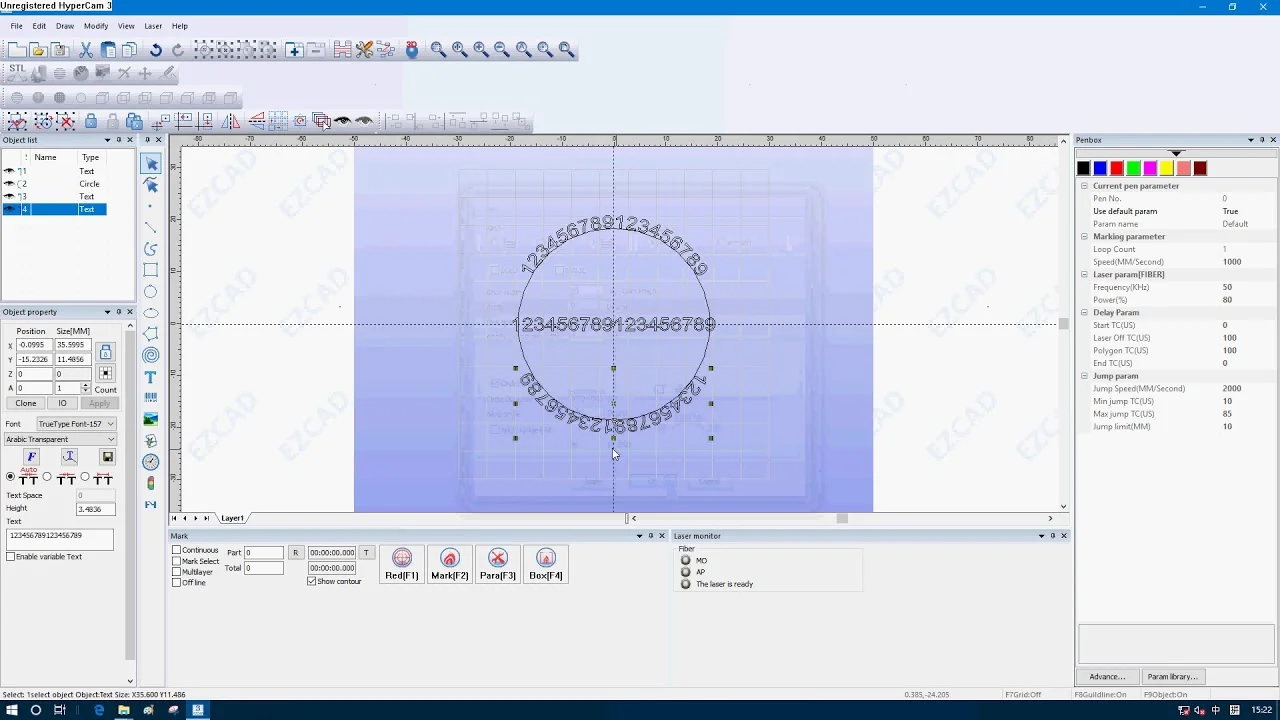
Acerca de EZCAD
EZCAD (2/3) is widely used with galvo fiber lasers using JCZ controllers. It imports AI/DXF/PLT vectors and images, supports hatch fills, serialization, and rotary marking. Powerful, Windows-only, with a utilitarian UI and a learning curve.
Tutorial en video
Nuestro tutorial recomendado para EZCAD
Ver el tutorial aquí
Preguntas frecuentes
What is EZCAD software and what kind of laser machines use it?
💡
EZCAD is a control software primarily used for laser marking/engraving machines, especially the fiber laser marking systems widely made in China. If you have a fiber laser engraver (or a galvo CO₂/UV laser), there's a good chance it uses a EZCAD-compatible controller. EZCAD drives the laser’s USB control board to mark text, patterns, and images on your workpiece. In short, it’s the default software for many galvo laser systems (like those with BJJCZ controllers). It's known to be the standard for a lot of 20W/30W fiber lasers sold on eBay/Amazon, etc., and is used in industries from jewelry engraving to industrial part marking.
Which operating systems does EZCAD run on? Is there a Mac version?
💡
EZCAD is a Windows-only application. It was developed for Windows and runs on 32-bit or 64-bit Windows (XP, Win7, Win8, Win10 are all supported). There is no Mac OS version of EZCAD available. So, if you're using a Mac, you'll need to run Windows via Boot Camp or a virtual machine to use EZCAD, or use alternative software that supports your laser hardware. (For example, LightBurn has added support for some galvo controllers and is cross-platform, which some Mac users consider as an alternative, though LightBurn’s galvo support is relatively new compared to EZCAD.)
What file formats can EZCAD import for engraving or marking?
💡
EZCAD supports a wide range of file types for both vector and raster data. On the image side, it can import common bitmap formats like BMP, JPG, GIF, PNG, TIF, etc. for engraving images or logos. For vector graphics, EZCAD accepts formats such as AI (Illustrator files), DXF, PLT (HPGL plotter files), and DST (embroidery files). This means you can design in many CAD or graphics programs and export to one of those formats. For example, you might export an SVG as a DXF or AI file to bring it into EZCAD. Additionally, EZCAD allows you to create text and basic shapes directly within the software, but complex designs are usually imported using the above file formats.
Does EZCAD require a dongle or license to use?
💡
Yes, typically EZCAD requires a hardware dongle or the proper controller board to run in full mode. EZCAD2 (commonly shipped with fiber lasers) comes with a USB dongle that acts as the license. If you run the software without the dongle (or if the device driver isn’t set up), EZCAD will launch in a restricted "demo" mode. In demo mode, you can open files and design, but you cannot output to the laser or save your work. In practice, when you buy a laser machine that uses EZCAD, the manufacturer provides the dongle or the control board itself has the license. Just be aware that if you see a "dongle not found" error, it means the software isn't detecting the hardware key, and it won’t function fully until that’s resolved.
Can EZCAD automate serial numbers or engrave barcodes/QR codes?
💡
Yes. One of EZCAD’s strengths in the marking industry is its support for variable data and codes. You can set up text that changes with each piece – for example, incrementing serial numbers or pulling data from an Excel spreadsheet in real-time. It also natively supports generating barcodes and QR codes: EZCAD includes font options for 1D barcodes and 2D DataMatrix/QR codes which you can embed as text elements. This means you can have the software automatically create, say, a unique QR code for each item or a serial number that increments on each mark, without needing to manually edit the design for every piece.