Ultime recensioni
 Ultimi articoli del blog





Explore LaserPecker Design Space with an in‑depth review of its features, mobile and desktop use, workflow performance, user feedback, and key limits.
Informazioni LaserPecker Design Space
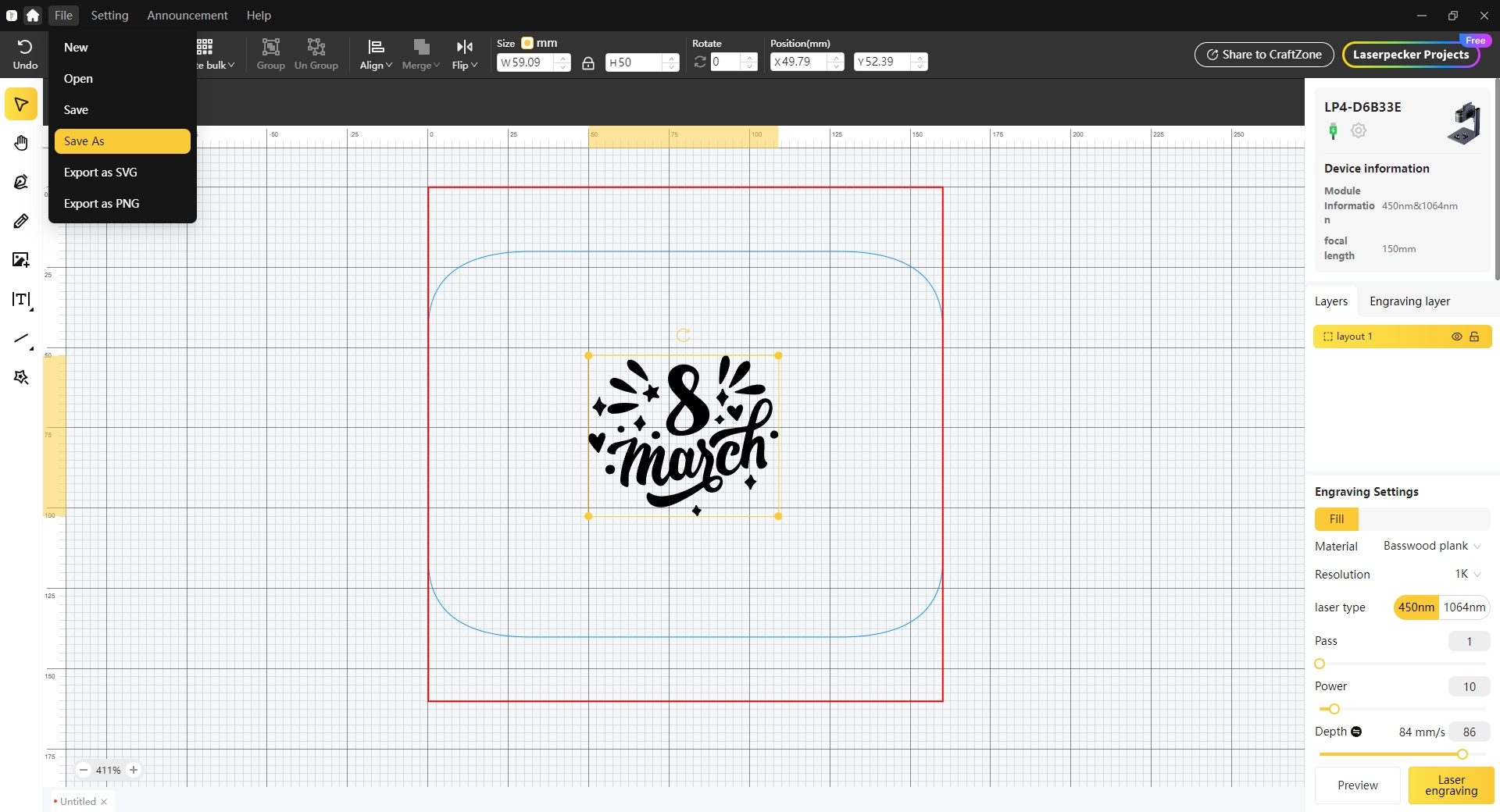
LaserPecker Design Space (LDS) is the proprietary software developed for LaserPecker's line of laser engraving machines. It functions as an integrated suite for design, editing, and machine control, available on mobile and desktop platforms. The software is designed to provide a user-friendly experience, particularly for hobbyists, educators, and small businesses, aiming to streamline the workflow from concept to execution. For many entry-level users, the mobile-first application allows for a quick setup, enabling simple engraving projects within minutes of unboxing the hardware. The software's intended functionality includes a range of design and editing tools, such as a text editor, a library of cliparts, and generators for QR codes and barcodes. It supports the import of various file formats, including common raster images (JPG, PNG) and vector files (SVG, DXF), to work with designs created in other programs. For machine operation, LDS provides controls for laser parameters like power, speed, and resolution, and includes modes to operate accessories such as rotary and slide extensions for engraving on cylindrical or oversized objects. User experiences with the software vary depending on the complexity of the tasks. While the mobile app is often cited as straightforward for basic projects, some users have reported challenges when undertaking more advanced work. These reported issues include software instability, such as application crashes or connectivity problems, and difficulties with reliably importing vector files like SVGs. Due to these limitations, some users, particularly those with a background in graphic design, adopt a workflow where designs are created and finalized in external, feature-rich software like Adobe Illustrator or Inkscape. They then use LDS primarily as a tool to send the finished design to the laser engraver. For certain models, the company advertises compatibility with third-party software like LightBurn, a popular choice among laser engraving professionals. However, user accounts suggest that this integration has limitations. When controlling LaserPecker hardware through LightBurn, some of the machine's native features—such as advanced control over the fiber laser or full support for the rotary attachment—may be inaccessible. This often requires users to revert to the proprietary LDS software to utilize the full capabilities of their hardware. In summary, LaserPecker Design Space serves as an accessible entry point into laser engraving, aligning with the hardware's focus on portability and ease of use for beginners. For more demanding applications, users may encounter performance and feature limitations that lead them to integrate other design tools into their process.

Tutorial video
Il nostro tutorial consigliato per LaserPecker Design Space
Guarda il tutorial qui